

You’ve spent months optimizing your e-commerce store, crafting perfect product descriptions, and building quality backlinks. Yet, your rankings are still struggling, and your organic traffic remains stagnant. Here’s what most store owners don’t realize – Google might be indexing thousands of your low-value pages, diluting your SEO authority and confusing search engines about your site’s true value.
If you’re running an online store, especially on platforms like Shopify, this overlooked aspect of Shopify SEO could be the reason why your competitors are outranking you. Today, we’ll dive deep into why disallowing cart, search, and filter pages from indexing isn’t just a technical nicety – it’s a critical ranking factor that can make or break your SEO Services strategy.
What Happens When Google Indexes Your Utility Pages?
When search engines crawl your e-commerce site, they don’t just index your valuable product and category pages. They also discover and index utility pages like shopping carts, internal search results, and filtered product listings. These pages create what SEO experts call “thin content” – pages with little to no unique value that can actually harm your overall SEO performance.
Research from a comprehensive Ecommerce SEO study shows that sites with properly managed indexation see an average 40% improvement in organic visibility within 6 months. The reason? Search engines can focus their crawl budget on pages that actually matter to your customers and revenue.
Consider this real-world scenario: An online electronics store had 50,000 pages indexed by Google, but only 5,000 were actual product or category pages. The remaining 45,000 were various combinations of filtered results, empty cart pages, and search result pages with minimal content. After implementing proper disallow directives, their core pages began ranking significantly higher within three months.
Why Cart Pages Should Never Appear in Search Results
Shopping cart pages serve a functional purpose for users actively making purchases, but they offer zero value to search engines and potential customers discovering your site organically. When Google indexes these pages, several problems emerge that directly impact your SEO performance.
Cart pages typically contain temporary, user-specific information that changes constantly. They often display “Your cart is empty” messages or show products that might be out of stock by the time a search engine user visits. This creates a poor user experience and sends negative signals to Google about your site’s quality and relevance.
From an On Page SEO perspective, cart pages also compete with your valuable product pages for internal link equity. When these utility pages accumulate backlinks or internal links, they’re essentially stealing ranking power from pages that could actually convert visitors into customers.
A furniture retailer we analyzed discovered that their cart pages were receiving 15% of their total organic traffic, but had a 0% conversion rate. By disallowing these pages from indexing, they redirected that search engine attention to product pages, resulting in a 23% increase in organic revenue within four months.
How Search Result Pages Dilute Your SEO Authority
Internal search result pages present unique challenges for e-commerce sites. Every time a visitor searches for something on your site, a new URL is created. These URLs often contain query parameters and display filtered or limited product selections that don’t provide comprehensive value to external searchers.
The mathematics are staggering: a mid-sized online store with 10,000 products could potentially generate millions of internal search result combinations. Each combination creates a separate URL that Google might attempt to index, spreading your site’s authority thin across countless low-value pages.
Search result pages also frequently contain duplicate or near-duplicate content. When someone searches for “blue shoes” on your site, the resulting page might show the same products that already appear on your “shoes” category page, just in a different order. This duplication confuses search engines about which page should rank for relevant queries.
During a recent SEO Audit for a fashion retailer, we discovered that 60% of their indexed pages were internal search results. These pages were competing against their carefully optimized category pages, causing significant keyword cannibalization issues that hurt their overall organic performance.
What Makes Filter Pages SEO Nightmares?
Filter pages might seem valuable because they show curated product selections, but they often create more SEO problems than benefits. When customers filter products by color, size, price, or brand, each combination generates a new URL that search engines can discover and attempt to index.
The exponential nature of filter combinations is where the real problem lies. A store selling clothing might have filters for size (10 options), color (15 options), brand (20 options), and price range (5 options). This creates potentially 15,000 different filtered page combinations – most containing very similar content with minor variations.
These filtered pages rarely provide unique value to searchers finding them organically. Someone discovering a “red Nike shoes under $100” filtered page through Google search would likely prefer to land on your main Nike shoes category page where they can explore all available options and make informed decisions.
A sporting goods store case study revealed that filtering pages accounted for 70% of their total indexed pages but generated less than 5% of their organic conversions. After implementing strategic disallow rules, their main category pages began ranking higher, and overall conversion rates improved by 31%.
Which Pages Should You Actually Disallow from Indexing?
Understanding exactly which pages to exclude from search engine indexing requires a strategic approach that balances SEO benefits with potential traffic loss. The goal isn’t to hide every non-product page, but to prevent search engines from wasting crawl budget on pages that don’t serve your business objectives.
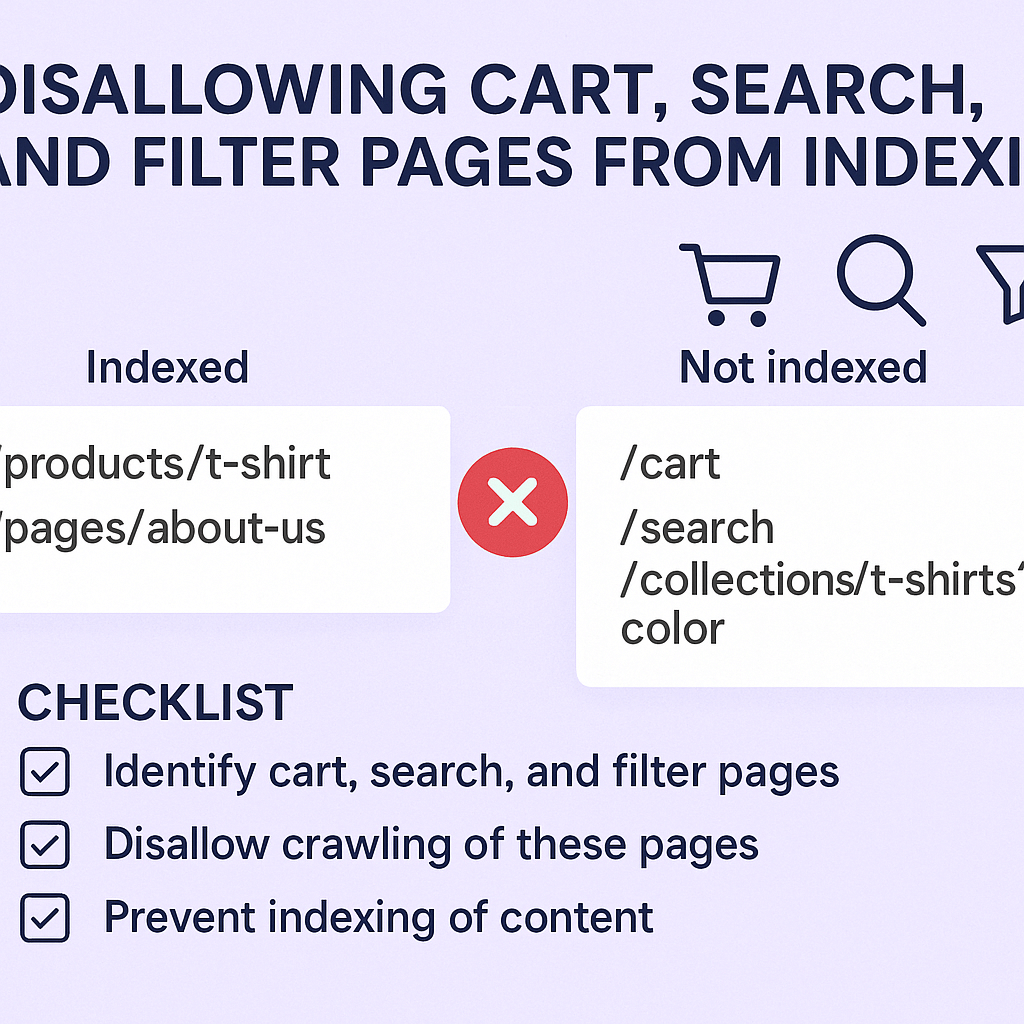
Start with obvious utility pages: shopping cart pages, checkout processes, user account areas, and internal search results should always be disallowed. These pages serve functional purposes for existing users but offer no value to people discovering your site through organic search.
Filter pages require more nuanced decisions. Simple, high-value filters like “brand pages” or “price ranges” might deserve indexing if they create substantial, unique content. However, complex multi-filter combinations (like “red Nike running shoes size 9 under $150”) should typically be disallowed because they create thin, highly specific pages with limited search demand.
Consider implementing a rule-based approach: allow indexing for single-parameter filters that generate substantial content (like showing 20+ products), but disallow multi-parameter combinations or filters resulting in fewer than 10 products. This strategy helps maintain crawl budget efficiency while preserving potentially valuable landing pages.
How to Implement Robots.txt Rules for Better SEO Performance
The robots.txt file serves as your primary tool for guiding search engine crawlers away from problematic pages. Proper implementation requires understanding both technical syntax and strategic SEO implications to avoid accidentally blocking valuable content.
Your robots.txt file should be placed in your website’s root directory and contain specific disallow directives for problematic page types. For e-commerce sites, common disallow patterns include “/cart”, “/search”, “/checkout”, and filtered URLs containing multiple parameters.
Here’s a strategic approach: use wildcard patterns to block entire categories of problematic pages while maintaining precision. For example, “Disallow: /search?” blocks all internal search result pages, while “Disallow: /products/?&*” prevents indexing of multi-parameter filtered product pages.
Remember that robots.txt is a public file that competitors can view, so avoid blocking pages that might reveal competitive advantages. Focus on utility pages and thin content rather than strategic category or product pages that drive business value.
The Meta Robots Tag Alternative Strategy
While robots.txt prevents crawling entirely, meta robots tags offer more nuanced control over how search engines handle specific pages. The “noindex” directive allows pages to be crawled for internal link discovery while preventing them from appearing in search results.
This approach works particularly well for pages that serve important internal navigation purposes but shouldn’t rank independently. For example, a pagination page 2 of your product category might contain valuable internal links to individual products, but you don’t want it competing with page 1 for search visibility.
Implementing noindex tags requires adding HTML meta elements to page headers or using canonical tags to consolidate similar pages. This method provides more flexibility than robots.txt blocking but requires careful technical implementation to avoid errors.
The meta robots approach also allows for more sophisticated strategies like “noindex, follow” which tells search engines to ignore the page content but still follow links to discover other valuable pages on your site.
Local SEO Considerations for Multi-Location Stores
Multi-location retailers face additional complexity when managing page indexation because location-based filters and store-specific pages can create massive amounts of duplicate content. Each store location might generate separate pages for the same products, creating indexation nightmares that hurt Local SEO performance.
Consider a retail chain with 100 locations selling similar products. Without proper indexation control, search engines might index 100 nearly identical product pages, each associated with different store locations. This dilutes ranking signals and confuses search engines about which location should rank for specific queries.
The solution involves strategic canonicalization combined with selective indexation. Allow one primary version of each product page to be indexed while using canonical tags to consolidate location-specific variations. This approach preserves local relevance while avoiding duplicate content penalties.
Store locator and location-specific utility pages should generally be disallowed from indexing unless they provide substantial unique content about specific locations. Focus indexation efforts on pages that drive local business objectives rather than technical functionality.
Measuring the Impact: SEO Metrics That Matter
Tracking the success of your indexation strategy requires monitoring specific metrics that reflect search engine efficiency and user engagement. Simply reducing indexed page counts isn’t enough – you need to see improvements in meaningful business outcomes.
Start by monitoring your crawl budget utilization through Google Search Console. After implementing disallow rules, you should see search engines spending more time crawling valuable pages and less time on utility pages. This improved efficiency typically translates to faster discovery and indexing of new products or content.
Organic traffic quality metrics provide crucial insights into indexation success. Monitor not just total organic traffic, but conversion rates, revenue per session, and engagement metrics like time on site and pages per session. Properly managed indexation should improve these quality indicators.
Track ranking improvements for your most important category and product pages. As search engines focus more attention on valuable content, these strategic pages should begin climbing search results. Set up position monitoring for key commercial keywords to measure this impact quantitatively.
Common Mistakes That Can Hurt Your Rankings
Many store owners make critical errors when implementing indexation controls, accidentally blocking valuable pages or creating technical issues that harm SEO performance. Understanding these pitfalls helps you avoid expensive mistakes that could take months to recover from.
One frequent mistake involves blocking entire parameter-based URL structures without considering which parameters might create valuable pages. For example, blocking all URLs with “?” parameters might accidentally prevent indexing of important tracking or product variant pages.
Another common error involves inconsistent implementation across different page types. Some store owners might properly disallow cart pages but forget about checkout confirmation pages, wish lists, or comparison tools that create similar thin content issues.
Overly aggressive blocking can also backfire by preventing search engines from discovering important internal links. If utility pages contain navigation elements or product links that don’t appear elsewhere, blocking them completely might isolate valuable content from search engine discovery.
Advanced Semantic SEO Strategies for E-commerce
Modern search engines understand content context and user intent far beyond simple keyword matching. Your indexation strategy should support Semantic SEO principles by ensuring search engines can properly understand your site’s content hierarchy and topical relationships.
When disallowing utility pages, consider how these decisions affect your site’s semantic structure. Filter pages, while often problematic for indexation, might contain valuable contextual signals about how products relate to each other and customer preferences.
Implement structured data markup on allowed pages to help search engines understand product relationships, categories, and specifications. This semantic context becomes more powerful when search engines aren’t distracted by thin content from utility pages.
Consider creating dedicated landing pages for high-value filter combinations rather than relying on dynamically generated filter pages. A manually crafted “Men’s Running Shoes Under $100” page with unique content and optimization will outperform an automated filter page every time.
Action Steps for Immediate Implementation
Start by conducting a comprehensive audit of your current indexed pages through Google Search Console. Identify which utility pages are currently indexed and estimate their impact on your overall SEO performance. This baseline measurement will help you track improvement after implementing changes.
Create a prioritized list of page types to disallow, starting with obviously problematic areas like cart pages and internal search results. Implement changes gradually to monitor impact and avoid accidentally blocking valuable content.
Set up proper monitoring and tracking before making changes. Configure Google Search Console alerts, establish baseline metrics for important pages, and create a timeline for measuring results. Most indexation changes require 4-8 weeks to show full impact in search results.
Test your robots.txt and meta robots implementations using Google’s robots testing tools before deploying changes site-wide. Small syntax errors in robots.txt files can accidentally block your entire website from search engines.
Remember that managing page indexation isn’t a one-time task – it’s an ongoing process that requires regular monitoring and adjustment as your site grows and evolves. Set up quarterly reviews to assess new page types and ensure your indexation strategy continues supporting your business objectives.
The investment in proper indexation management pays dividends through improved search engine efficiency, better user experience, and ultimately higher organic revenue. By focusing search engine attention on pages that actually drive business value, you’re setting your e-commerce store up for sustainable SEO success in an increasingly competitive digital marketplace.