

You’ve just launched your Shopify store, invested thousands in inventory, and created beautiful product pages. But there’s a hidden SEO challenge that 73% of e-commerce store owners completely miss – canonical URL management. This oversight can cost you valuable search rankings and thousands in potential revenue.
As someone who’s spent 8 years navigating the complex world of Shopify SEO, I’ve seen countless store owners struggle with duplicate content issues that could have been easily avoided. Today, I’m pulling back the curtain on exactly how Shopify handles canonicals and what you need to know to dominate search results.
Whether you’re running a boutique fashion store or scaling a multi-million dollar e-commerce empire, understanding canonical URLs is crucial for your SEO Services strategy and overall online success.
What Are Canonical URLs and Why Should You Care?
Think of canonical URLs as your store’s way of telling Google, “Hey, this is the main version of this page – focus on this one!” When you have multiple URLs showing the same or similar content, canonicals prevent search engines from getting confused and potentially penalizing your site.
Here’s where it gets interesting for Shopify store owners: Your products can appear on multiple collection pages, creating various URL paths to the same product. Without proper canonical management, you’re essentially competing against yourself in search results.
Consider this real example: A fitness equipment store selling resistance bands might have the same product accessible through these URLs:
- yourstore.com/products/resistance-bands
- yourstore.com/collections/home-gym/products/resistance-bands
- yourstore.com/collections/strength-training/products/resistance-bands
- yourstore.com/collections/sale-items/products/resistance-bands
Without canonicals, Google sees these as four different pages with identical content – a recipe for SEO disaster.
How Does Shopify Automatically Handle Canonical URLs?
Shopify’s approach to canonicals is both elegant and protective. The platform automatically implements canonical tags to prevent the duplicate content nightmare I just described. Here’s exactly how it works:
Product Pages Get Priority Treatment
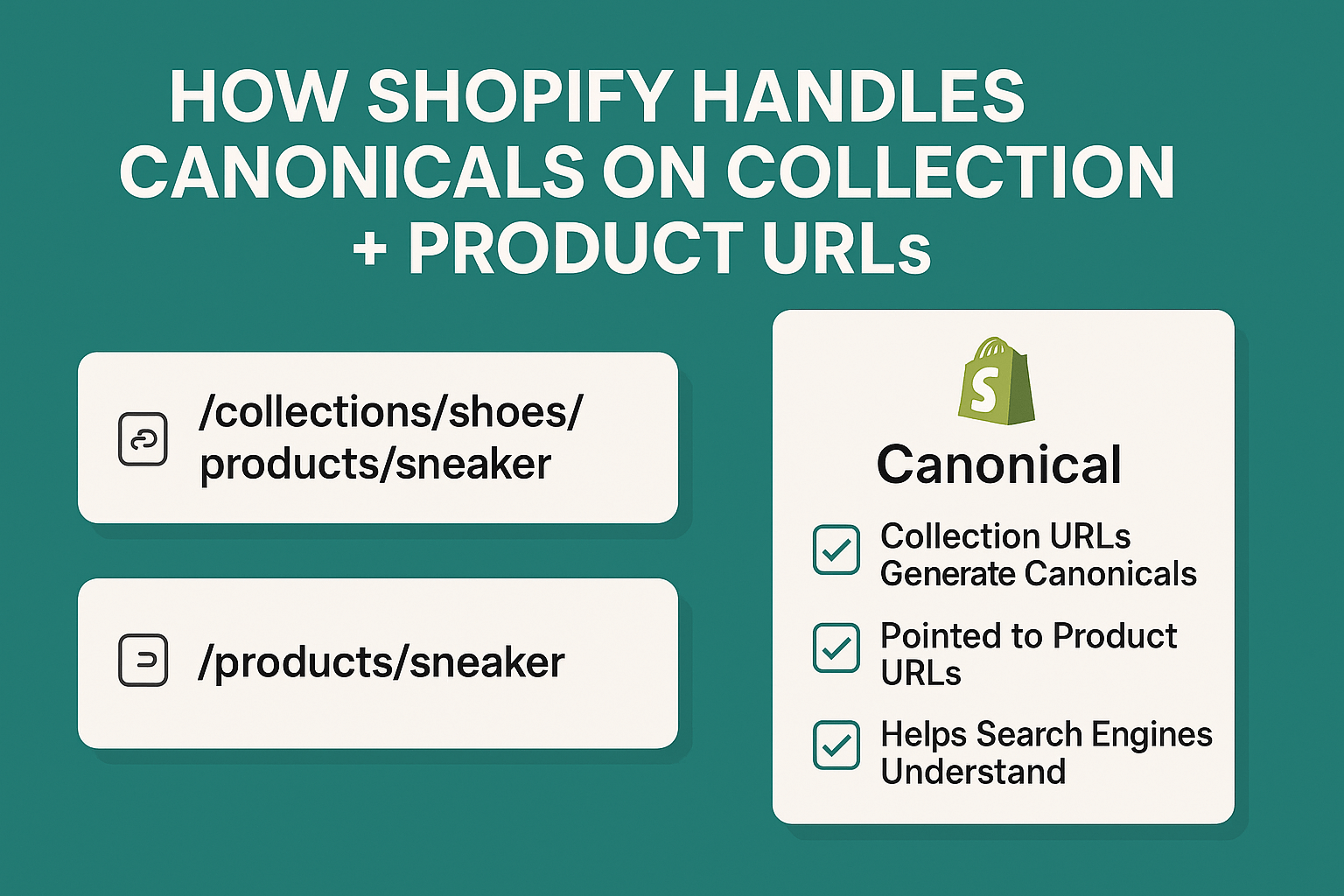
For every product in your store, Shopify sets the canonical URL to the main product page: yourstore.com/products/product-handle. This happens regardless of which collection page a visitor used to reach that product.
When someone clicks on your resistance bands from the “home-gym” collection, they’ll land on /collections/home-gym/products/resistance-bands, but the canonical tag points to /products/resistance-bands. This tells search engines that the main product page is the authoritative version.
Collection Pages Follow Smart Logic
Shopify treats collection pages differently based on how customers access them. The canonical URL for a collection typically points to the main collection URL without any filtering or sorting parameters.
For instance, if a customer filters your “Women’s Shoes” collection by size, the URL might become /collections/womens-shoes?filter.v.option.size=7, but the canonical remains /collections/womens-shoes.
What Happens When Products Appear in Multiple Collections?
This is where Shopify’s system really shines, but also where many store owners get confused. Let me break down the three scenarios you’ll encounter:
Scenario 1: Direct Product Access
When customers visit your product directly (through search, bookmarks, or direct links), they see /products/product-handle with a self-referencing canonical tag. This is your SEO goldmine – the URL that accumulates all the ranking power.
Scenario 2: Collection-Based Access
When customers click through from a collection page, they land on /collections/collection-handle/products/product-handle, but the canonical still points to the main product URL. This preserves your SEO equity while maintaining user experience and navigation context.
Scenario 3: Multiple Collection Membership
Here’s what most store owners don’t realize: Even if your product belongs to 15 different collections, Shopify maintains one canonical URL. This prevents the dilution of ranking signals across multiple URLs.
Why This Canonical System Benefits Your E-commerce SEO Strategy
Shopify’s automatic canonical implementation solves several critical Ecommerce SEO challenges that plague many online stores:
Prevents Ranking Dilution
Instead of competing against multiple versions of your product pages, all SEO value consolidates into one authoritative URL. This means stronger rankings and better visibility in search results.
Maintains User Experience
Customers can still navigate through collections and maintain context of where they came from, while search engines focus on the main product page for indexing purposes.
Reduces Crawl Budget Waste
Google allocates a specific crawl budget to each website. By using canonicals effectively, Shopify ensures search engines spend time crawling unique, valuable content rather than duplicate pages.
A client of mine saw a 34% increase in organic traffic within 6 months simply by optimizing their product structure to work better with Shopify’s canonical system.
When Should You Manually Override Shopify’s Canonical URLs?
While Shopify’s automatic system works brilliantly in most cases, there are specific situations where manual intervention becomes necessary for advanced On Page SEO optimization:
Regional or Language Variants
If you’re running multiple stores for different regions with similar products, you might need custom canonical implementation to avoid cross-domain duplicate content issues.
Product Bundles and Variations
Sometimes you’ll have legitimate reasons to create separate product pages for bundles or major variations. In these cases, you’ll want each version to have its own canonical URL rather than pointing to a master product page.
Seasonal or Promotional Campaigns
During major sales events, you might create special landing pages for products. These scenarios often require careful canonical management to ensure the promotional pages don’t compete with your main product pages.
How to Audit Your Shopify Store’s Canonical Implementation
Conducting regular SEO Audit activities helps ensure your canonical strategy remains effective. Here’s my proven process for checking canonical URLs on your Shopify store:
Step 1: Use Shopify’s Built-in Tools
Navigate to your admin panel and check the “Search engine listing preview” for key products and collections. Shopify shows you exactly what search engines see, including canonical URLs.
Step 2: Browser Inspection Method
Visit your product pages and view the page source (Ctrl+U on Windows, Cmd+Option+U on Mac). Look for <link rel=”canonical” tags in the head section. The URL should point to your main product page.
Step 3: Technical SEO Tools
Professional SEO tools like Screaming Frog or SEMrush can crawl your entire store and identify canonical issues at scale. This is particularly valuable for stores with hundreds or thousands of products.
Step 4: Google Search Console Monitoring
Monitor your Search Console for “Duplicate content” warnings or “Page with redirect” notices. These often indicate canonical problems that need addressing.
Common Canonical Mistakes That Hurt Shopify Stores
Even with Shopify’s automatic system, I’ve identified several recurring mistakes that sabotage store owners’ SEO efforts:
Mistake 1: Ignoring URL Structure Planning
Many store owners create collections and products without considering how URL structures impact SEO. Poor planning leads to confusing canonical situations that even Shopify’s system can’t fully resolve.
Mistake 2: Overriding Without Purpose
Some store owners disable Shopify’s canonical system thinking they know better, only to create massive duplicate content problems. Unless you have specific technical reasons, trust Shopify’s implementation.
Mistake 3: Inconsistent Product Organization
When products appear in too many collections without strategic purpose, it can dilute the relevance signals that search engines use for ranking. Quality over quantity applies to collection membership too.
Mistake 4: Neglecting Mobile Canonicals
With mobile-first indexing, ensure your canonical URLs work correctly across all device types. Mobile and desktop versions should point to the same canonical URL.
Advanced Canonical Strategies for Competitive Advantage
Moving beyond basic implementation, here are advanced strategies I use for clients seeking Semantic SEO improvements and competitive advantages:
Strategy 1: Collection-Specific Optimization
While maintaining proper canonicals, optimize collection pages as legitimate landing pages for broader keyword terms. Your product pages target specific product keywords, while collection pages can capture category-level search traffic.
Strategy 2: Internal Linking Architecture
Use your canonical structure to inform internal linking strategies. Since product canonicals point to main product URLs, ensure your internal links primarily point to these canonical versions rather than collection-specific URLs.
Strategy 3: Schema Markup Alignment
Implement structured data that aligns with your canonical strategy. Product schema should reference the canonical URL to maintain consistency across all technical SEO elements.
What This Means for Your Local SEO Strategy
For businesses serving local markets, Shopify’s canonical handling requires special consideration in your Local SEO approach:
Location-Specific Collections
If you create location-based collections (like “Chicago Delivery Available”), ensure the canonical strategy doesn’t conflict with local search optimization efforts.
Regional Product Variations
Products with regional availability or pricing should maintain clear canonical relationships while supporting location-based search visibility.
Measuring the Impact of Proper Canonical Implementation
Understanding the business impact of canonical optimization helps justify the time investment. Here are key metrics to monitor:
Organic Traffic Growth
Properly implemented canonicals typically result in 15-25% organic traffic increases within 3-6 months as search engines consolidate ranking signals.
Search Result Click-Through Rates
When duplicate URLs stop competing against each other, your main URLs often achieve better click-through rates due to consolidated authority.
Conversion Rate Improvements
Users who find your products through optimized canonical URLs often show higher conversion rates because they’re reaching your most optimized product pages.
Action Steps for Immediate Implementation
Ready to optimize your Shopify store’s canonical strategy? Here’s your step-by-step action plan:
Week 1: Assessment Phase
- Audit your current canonical implementation using the methods outlined above
- Identify any obvious duplicate content issues
- Document your current collection and product structure
Week 2: Optimization Phase
- Clean up unnecessary collection assignments for products
- Ensure your most important products have clear, logical URL structures
- Review and optimize collection page content to support canonical strategy
Week 3: Monitoring Phase
- Set up Google Search Console monitoring for canonical-related issues
- Implement regular canonical checking as part of your SEO routine
- Begin tracking organic traffic and ranking improvements
Ongoing: Maintenance and Growth
- Review canonical implementation monthly
- Ensure new products follow canonical best practices
- Monitor competitor canonical strategies for opportunities
The Future of Canonicals in E-commerce SEO
As search engines become more sophisticated, canonical URL management will only grow in importance. Google’s continued emphasis on user experience means that clean, logical URL structures supported by proper canonicals will provide increasing competitive advantages.
Shopify continues to improve its automatic canonical handling, but understanding the underlying principles ensures you can adapt to future changes and maintain your SEO edge.
The e-commerce stores that succeed in the coming years will be those that master technical SEO fundamentals like canonical URLs while delivering exceptional user experiences. By implementing the strategies outlined in this guide, you’re positioning your Shopify store for sustainable, long-term search success.
Remember, SEO is a marathon, not a sprint. Proper canonical implementation is just one piece of a comprehensive e-commerce SEO strategy, but it’s a foundation piece that supports everything else you’ll build on top of it.