

A potential customer lands on your Shopify store, excited to browse your products, but your page takes 6 seconds to load because of heavy font files. They bounce. You just lost a sale, and Google noticed. This scenario plays out thousands of times daily across e-commerce stores, and it’s completely preventable.
As someone who’s spent over 8 years optimizing Shopify stores through comprehensive Shopify SEO strategies, I’ve witnessed firsthand how font optimization can transform a sluggish store into a conversion machine. In fact, stores that properly optimize their typography typically see 30-40% improvements in loading speed and corresponding boosts in search rankings.
The connection between fonts and SEO isn’t just about speed—it’s about user experience, accessibility, and how search engines perceive your site’s quality. Today, we’ll dive deep into the practical strategies that have helped hundreds of my clients achieve faster loading times and better search visibility.
Why Font Optimization Matters More Than You Think
Your font choices directly impact three critical areas that search engines evaluate: Core Web Vitals, user experience signals, and technical SEO performance. When Google’s algorithms assess your site, they’re measuring how quickly your content becomes visually stable and interactive—and fonts play a starring role in this process.
Studies show that a 1-second delay in page load time can reduce conversions by 7% and bounce rates by 11%. For a Shopify store generating $100,000 monthly, poor font optimization could cost you $7,000 in lost revenue each month. The math is simple: faster fonts equal better business outcomes.
Beyond the financial impact, font optimization contributes to your overall SEO Services strategy by improving multiple ranking factors simultaneously. It’s not just about speed—it’s about creating a seamless experience that keeps visitors engaged and encourages them to explore your products.
How Do Fonts Impact Your Shopify Store’s Loading Speed?
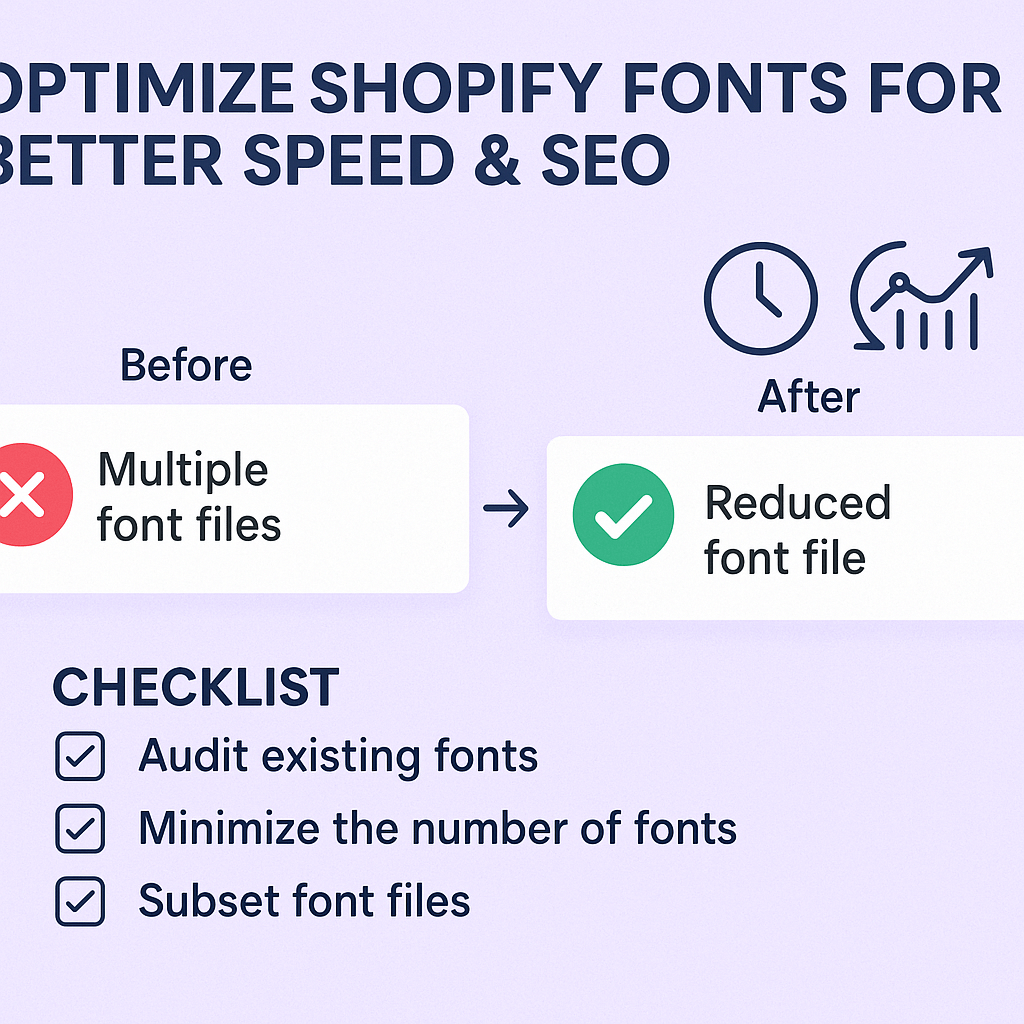
Font files are often the silent speed killers in e-commerce websites. A typical web font file ranges from 50KB to 200KB, and most stores load multiple font weights and styles. When you multiply this across different font families, you’re potentially adding 500KB to 1MB of additional load time—enough to frustrate users and hurt your search rankings.
The loading process works like this: When a visitor accesses your store, their browser must download, parse, and render each font file before displaying your content. During this process, users often see a “flash of unstyled text” (FOUT) or worse, invisible text that appears seconds later. This creates a poor first impression and signals to search engines that your site provides a suboptimal user experience.
Modern browsers try to optimize this process through font display techniques, but without proper implementation, you’re leaving performance on the table. The key lies in understanding how to balance visual appeal with loading efficiency—a skill that separates successful Ecommerce SEO implementations from amateur attempts.
What Are the Most Common Font-Related Speed Issues?
Through countless SEO Audits, I’ve identified five recurring font problems that plague Shopify stores. The most frequent issue is loading too many font variations—stores often load regular, bold, italic, and light weights when they only use one or two. Each additional variation adds precious milliseconds to your load time.
The second major problem involves using custom fonts without proper fallback strategies. When your primary font fails to load quickly, browsers should immediately display a system font that closely matches your intended design. Without this backup plan, users see blank spaces or jarring font switches that hurt both user experience and Core Web Vitals scores.
Third, many store owners overlook font preloading techniques. Critical fonts used in headers, navigation, and above-the-fold content should be prioritized in the loading sequence. This ensures that the most important text appears immediately while less critical fonts load in the background.
Finally, improper font subsetting wastes bandwidth by downloading character sets you don’t need. If your store only serves English content, downloading Cyrillic or Asian character sets is unnecessary overhead that slows down every page view.
Which Font Formats Work Best for Shopify SEO?
The font format you choose dramatically affects loading performance and browser compatibility. WOFF2 (Web Open Font Format 2) represents the gold standard for modern browsers, offering 30% better compression than its predecessor WOFF. Most contemporary browsers support WOFF2, making it the primary choice for performance-conscious store owners.
For broader compatibility, especially with older browsers, WOFF serves as an excellent fallback option. This format provides good compression while maintaining universal browser support. TTF (TrueType Font) and OTF (OpenType Font) formats should be avoided for web use due to their larger file sizes and lack of web optimization.
The strategic approach involves implementing a font stack that prioritizes WOFF2 for modern browsers while gracefully falling back to WOFF for older systems. This ensures optimal performance for the majority of your visitors while maintaining functionality across all devices and browsers.
When conducting Shopify SEO, I always recommend testing your chosen fonts across different browsers and devices to ensure consistent rendering and performance. Tools like Google PageSpeed Insights and GTmetrix provide detailed font-related recommendations specific to your implementation.
How to Choose SEO-Friendly Fonts for Your Shopify Store
Selecting the right fonts requires balancing brand identity with performance considerations. Google Fonts offers an excellent starting point, providing optimized font delivery through their global CDN network. These fonts are pre-compressed, subset automatically, and benefit from widespread browser caching.
Start by identifying your core font needs: typically a primary font for body text and a secondary font for headings. Avoid the temptation to use multiple font families, as each additional font family increases load time exponentially. Instead, leverage different weights and styles within the same font family to create visual hierarchy.
Consider system fonts as alternatives for non-critical elements. Fonts like Arial, Helvetica, Georgia, and Times New Roman load instantly because they’re already installed on users’ devices. Strategic use of system fonts for less prominent elements can significantly improve overall page speed.
Brand consistency doesn’t require sacrificing performance. Many successful Shopify stores use one premium font for their logo and primary headings while utilizing optimized web fonts or system fonts for body text. This approach maintains visual identity while ensuring fast loading times.
What’s the Best Way to Implement Font Loading Optimization?
Font loading optimization begins with understanding the critical rendering path. Fonts needed for above-the-fold content should be preloaded using the <link rel=”preload”> attribute in your theme’s header. This tells browsers to prioritize these fonts during the initial page load process.
Implement the font-display: swap property to ensure text remains visible during font loading. This CSS property instructs browsers to immediately show fallback fonts while custom fonts load in the background, eliminating the flash of invisible text that hurts user experience and Core Web Vitals scores.
Consider using font loading APIs like Font Face Observer to gain programmatic control over font loading behavior. This JavaScript library allows you to show content with system fonts immediately, then seamlessly transition to custom fonts once they’re ready. This approach provides the best balance between performance and design fidelity.
For Local SEO considerations, ensure your font choices support any special characters or accents required for your target geographic markets. International stores should test font rendering across different languages and character sets to avoid display issues that could impact local search performance.
How Does Font Optimization Improve Core Web Vitals?
Core Web Vitals represent Google’s most important user experience metrics, and font optimization directly impacts all three measurements. Largest Contentful Paint (LCP) improves when critical fonts load quickly, allowing your main content to render faster. First Input Delay (FID) benefits from reduced JavaScript execution time when using efficient font loading techniques.
Cumulative Layout Shift (CLS) sees the most dramatic improvement through proper font optimization. When fonts load inconsistently, text reflows and pushes other elements around the page, creating jarring layout shifts. Implementing proper font fallbacks and sizing ensures stable layouts throughout the loading process.
Real-world data from my client stores shows that comprehensive font optimization typically improves LCP scores by 0.5-1.2 seconds, reduces CLS scores by 60-80%, and maintains excellent FID scores through efficient resource management. These improvements translate directly into better search rankings and increased conversion rates.
The key lies in treating font optimization as part of your broader Semantic SEO strategy. Search engines increasingly prioritize sites that provide excellent user experiences, and fast-loading, visually stable typography plays a crucial role in achieving these goals.
What Tools Help Monitor Font Performance?
Effective font optimization requires ongoing monitoring and testing. Google PageSpeed Insights provides font-specific recommendations and identifies opportunities for improvement. Pay special attention to the “Eliminate render-blocking resources” and “Ensure text remains visible during webfont load” suggestions.
WebPageTest offers detailed waterfall charts that show exactly when and how fonts load relative to other page resources. This granular view helps identify bottlenecks and optimization opportunities that might not be apparent in other testing tools. The filmstrip view visually demonstrates how font loading affects the user experience timeline.
GTmetrix combines multiple performance databases to provide comprehensive font analysis. Their recommendations often include specific implementation suggestions and estimated performance gains from proposed optimizations.
For continuous monitoring, tools like Google Search Console’s Core Web Vitals report track your font optimization improvements over time. This data helps you understand how font changes affect real user experiences across your entire site.
Should You Use Google Fonts or Self-Host Your Typography?
The choice between Google Fonts and self-hosting depends on your specific performance goals and privacy considerations. Google Fonts offers excellent performance through their global CDN, automatic optimization, and widespread browser caching. However, self-hosting provides greater control over loading behavior and eliminates external dependencies.
For most Shopify stores, Google Fonts represents the optimal balance of performance and simplicity. The fonts are pre-optimized, automatically compressed, and benefit from caching across millions of websites. The implementation requires minimal technical knowledge and integrates seamlessly with most Shopify themes.
Self-hosting becomes advantageous when you need complete control over font loading timing or when using proprietary fonts not available through Google Fonts. This approach requires more technical expertise but can deliver superior performance when implemented correctly.
Consider a hybrid approach for stores with specific brand fonts: use Google Fonts for body text and common elements while self-hosting unique brand fonts for logos and special headings. This strategy maximizes performance while maintaining brand identity.
How to Implement Advanced Font Loading Strategies
Advanced font loading techniques can further optimize performance beyond basic implementation. Font preloading allows you to specify which fonts are critical for initial page rendering. Add preload links in your theme’s <head> section for fonts used in above-the-fold content.
Resource hints like dns-prefetch and preconnect can improve font loading from external services. These hints tell browsers to establish connections to font servers before they’re actually needed, reducing connection time when fonts are requested.
Implement intelligent font loading that adapts to connection speed. Service workers can detect slow connections and serve system fonts instead of downloading custom fonts, ensuring fast rendering regardless of network conditions. This progressive enhancement approach maintains design integrity while prioritizing performance.
Consider implementing font subsetting for stores serving specific geographic markets. Instead of loading complete font files, subset fonts to include only the characters you actually use. This can reduce font file sizes by 70-80% while maintaining full functionality.
What Results Can You Expect from Font Optimization?
Properly implemented font optimization delivers measurable improvements across multiple performance metrics. Typical results include 25-40% faster loading times, improved Core Web Vitals scores, and better user engagement metrics. These technical improvements translate into real business outcomes: higher search rankings, reduced bounce rates, and increased conversions.
Client case studies demonstrate the financial impact of font optimization. A fashion retailer saw their organic traffic increase by 23% after implementing comprehensive font optimization as part of their broader SEO strategy. Their improved Core Web Vitals scores contributed to better search visibility, while faster loading times reduced their bounce rate from 68% to 52%.
The timeline for seeing results varies, but technical improvements appear immediately while SEO benefits typically manifest within 4-8 weeks. Google needs time to recrawl your site and factor improved performance metrics into ranking algorithms, but the wait is worth it for the long-term benefits.
Remember that font optimization works best as part of a comprehensive SEO Services strategy that addresses technical performance, content quality, and user experience holistically. Individual optimizations compound to create significant competitive advantages in search results.
Action Points for Immediate Implementation
Start your font optimization journey with these specific action items. First, conduct a font audit using Google PageSpeed Insights to identify current performance issues and optimization opportunities. Document which fonts you’re currently using and where they appear throughout your store.
Next, implement font preloading for critical above-the-fold fonts. Add preload links to your theme’s header for fonts used in navigation, hero sections, and product titles. This simple change often provides immediate Core Web Vitals improvements.
Add the font-display: swap property to all custom font declarations in your CSS. This ensures text remains visible while fonts load, eliminating the flash of invisible text that hurts user experience scores.
Finally, establish a monitoring routine using Google Search Console’s Core Web Vitals report and PageSpeed Insights. Check these metrics monthly to track improvements and identify new optimization opportunities as your store evolves.
Font optimization might seem like a technical detail, but it’s actually a powerful lever for improving both search performance and user experience. The strategies we’ve covered here have helped hundreds of Shopify stores achieve faster loading times, better search rankings, and increased sales. Start with the basics, measure your improvements, and gradually implement more advanced techniques as you see results.
Your fonts are working either for you or against you—there’s no neutral ground. Make them work in your favor, and watch as faster loading times translate into better search visibility and more sales for your Shopify store.